

The Summerville HVAC Maintenance Checklist
The Summerville HVAC Maintenance Checklist That Prevents 90% of Repairs Regular HVAC maintenance prevents up to 90% of common repairs and extends system lifespan by 5-7 years. Summerville homeowners should perform monthly tasks (filter checks, vent clearing, thermostat monitoring), seasonal tasks (condensate drain treatment, outdoor unit cleaning, refrigerant line inspection), and schedule professional tune-ups twice yearly—in spring before cooling season and fall before heating season. The Lowcountry’s extreme humidity, extended cooling season, and airborne particulates demand more frequent maintenance than national guidelines suggest. A well-maintained system runs more efficiently, breaks down less often, and keeps your home comfortable year-round. Introduction: The Cheapest Repair Is the One You Never Need Here’s a number that should get your attention: 90%. That’s the percentage of HVAC repairs that could have been prevented with proper maintenance. Nine out of ten service calls we make in Summerville are for problems that didn’t have to happen. Clogged filters that caused compressors to overheat. Condensate drains that backed up and flooded ceilings. Capacitors that failed because coils were too dirty to dissipate heat. Refrigerant leaks that started as minor corrosion nobody caught. Every one of these repairs cost the homeowner hundreds—sometimes thousands—of dollars. And every one of them was preventable. At Coastal Carolina Comfort, we’ve maintained HVAC systems across the Lowcountry for over a decade. We’ve seen what neglect does to equipment in our climate. We’ve also seen homeowners who follow a simple maintenance routine go 10+ years without a single major repair. This guide gives you that routine. It’s specifically designed for Summerville’s climate—not generic advice written for somewhere with mild summers and low humidity. Follow this checklist, and you’ll dramatically reduce your repair bills, extend your system’s life, and stay comfortable no matter what the Lowcountry weather throws at you. Why Summerville Systems Need More Maintenance Before we dive into the checklist, let’s talk about why maintenance matters more here than almost anywhere else. The Extended Cooling Season In Minneapolis, an AC might run 4 months per year. In Summerville, we’re cooling 8-9 months—sometimes longer. That’s twice the operating hours, twice the wear, and twice the opportunity for problems to develop. A system that runs from April through November accumulates wear equivalent to nearly two years of operation in a milder climate. Maintenance intervals need to reflect that reality. The Humidity Factor Summerville’s average humidity hovers around 70-80% year-round. During summer mornings, it regularly exceeds 90%. This humidity: Forces your system to work harder (dehumidification uses significant energy) Creates ideal conditions for biological growth in drain lines and on coils Accelerates corrosion on electrical components and refrigerant lines Causes condensate drain clogs—one of the most common service calls we see Related: Learn how Summerville’s humidity damages HVAC systems Airborne Particulates Between pollen season (which feels like it lasts 8 months here), coastal salt air, and general Lowcountry dust, your system filters more particulates than systems in cleaner environments. Filters clog faster, coils get dirtier, and airflow restrictions develop more quickly. The Bottom Line National maintenance guidelines assume average conditions. Summerville doesn’t have average conditions—we have extreme conditions. Your maintenance routine needs to account for that. Monthly Maintenance Tasks These quick tasks take 10-15 minutes and should become habit. Do them on the same day each month—the first Saturday, the day you pay your mortgage, whatever helps you remember. 1. Check and Replace Your Air Filter This is the single most important thing you can do for your HVAC system. A clogged filter: Restricts airflow, forcing your system to work harder Causes evaporator coils to freeze Leads to compressor overheating and failure Increases energy consumption by 5-15% Reduces indoor air quality How to check: Locate your filter (return air grille, air handler, or dedicated filter slot) Remove the filter and hold it up to light If you can’t see light through it clearly, replace it If it’s visibly gray or caked with debris, replace it immediately Summerville-specific guidance: During peak cooling season (May-September), check weekly and replace every 30-45 days During shoulder seasons, check monthly and replace every 45-60 days During pollen season (spring), you may need to replace every 2-3 weeks After storms or high-wind events, check immediately Filter recommendations: Use pleated filters rated MERV 8-11 for best balance of filtration and airflow Avoid fiberglass filters (minimal filtration) and ultra-high MERV ratings (can restrict airflow) Buy filters in bulk—you’ll use 8-12 per year in Summerville 2. Clear Supply and Return Vents Blocked vents disrupt airflow balance and force your system to work harder. Monthly walkthrough: Check all supply vents (where air blows out) for obstructions Check all return vents (where air is pulled in) for blockages Move furniture, curtains, rugs, or stored items that block airflow Vacuum vent covers to remove dust buildup Ensure all vents are open (closing vents doesn’t save energy—it creates pressure imbalances) 3. Monitor Thermostat Performance Your thermostat is the brain of your HVAC system. Small issues here cause big problems. Monthly checks: Verify the display is clear and responsive Confirm the temperature reading seems accurate (compare to a separate thermometer) Check that the system responds when you adjust settings Replace batteries annually (or when the low battery indicator appears) For smart thermostats, ensure WiFi connection is stable Warning signs: Temperature swings greater than 2-3 degrees from setpoint System not responding to setting changes Blank or flickering display “Auxiliary heat” running frequently (for heat pump systems) 4. Listen and Observe Your system tells you when something’s wrong—if you’re paying attention. Monthly awareness check: Listen for unusual noises (grinding, squealing, banging, clicking) Notice any unusual odors from vents Feel for weak airflow or temperature inconsistencies Watch for water around the indoor unit Check for ice on refrigerant lines (visible at the outdoor unit) Related: Know the 5 warning signs your AC is about to break down Seasonal Maintenance Tasks These tasks should be performed quarterly or at the start of each season. They’re more involved than monthly tasks but still manageable for most homeowners. Spring: Prepare for Cooling Season Complete these tasks in
HVAC Repair vs. Replacement
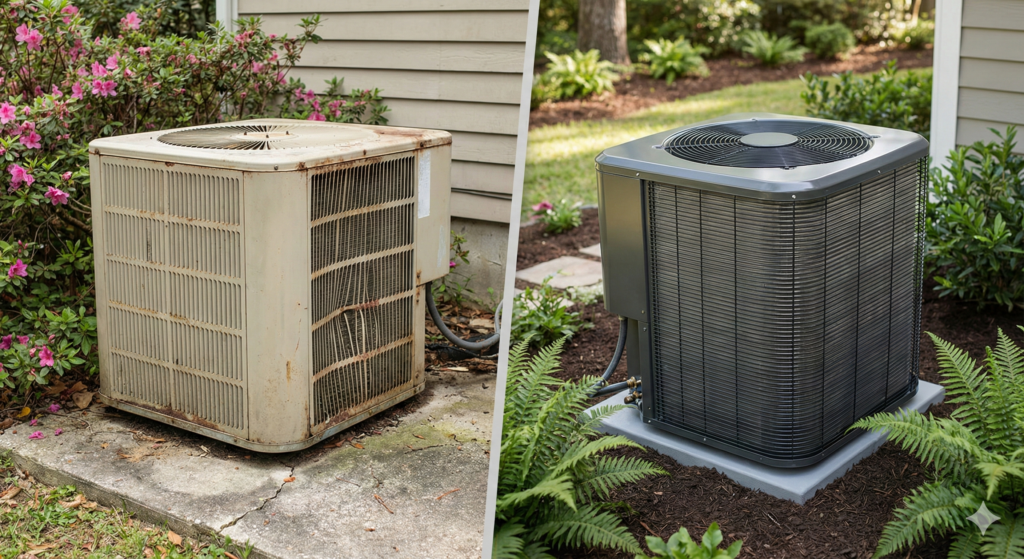
HVAC Repair vs. Replacement: A Summerville Homeowner’s Decision Guide Deciding between HVAC repair and replacement comes down to four key factors: the cost of repair relative to replacement (use the 50% rule—if repairs exceed half the cost of a new system, replace), the age of your equipment (systems over 15 years old are usually better replaced), refrigerant type (R-22 systems should be replaced due to phase-out costs), and repair frequency (multiple repairs per year signal it’s time). Summerville homeowners should also factor in energy efficiency gains, available rebates, and the demanding Lowcountry climate that shortens system lifespans compared to national averages. The Question Every Homeowner Dreads Your HVAC technician just delivered the news: your system needs a major repair. Maybe it’s a compressor. Maybe it’s a coil leak. Whatever it is, the number has four digits, and now you’re facing the question every Summerville homeowner eventually confronts. Do I fix it, or do I replace the whole thing? It’s not an easy decision. Repair feels like the cheaper option—until you’re repairing again six months later. Replacement feels like the responsible choice—until you see the price tag. And everyone from your neighbor to your brother-in-law has an opinion. At Coastal Carolina Comfort, we’ve guided thousands of Lowcountry homeowners through this exact decision. We’ve seen people waste money repairing systems that should have been replaced years ago. We’ve also seen people replace perfectly good equipment because someone talked them into it. This guide will give you the framework to make the right decision for your situation—not based on sales pressure, but on facts, math, and what actually makes sense for your home and budget. The 50% Rule: Your Starting Point The most reliable rule of thumb in the HVAC industry is simple: If the repair costs more than 50% of what a new system would cost, replace instead of repair. Here’s why this works: The Math Behind the Rule Let’s say a new HVAC system for your Summerville home costs $8,000 installed. Using the 50% rule: Repair cost under $4,000: Repair is likely the better value Repair cost over $4,000: Replacement makes more financial sense But this isn’t just about today’s repair. It’s about what comes next. A system that needs a $3,500 repair today is likely to need another significant repair within 1-2 years. That’s the nature of aging equipment—when major components fail, others are usually close behind. So that $3,500 repair might actually cost you $3,500 + $1,200 + $800 over the next two years. Suddenly you’ve spent $5,500 and still have an old, inefficient system. When to Adjust the Rule The 50% rule is a starting point, not an absolute. Adjust based on: System age: For systems under 8 years old, you might stretch to 60-70% before replacing—they likely have more good years ahead. For systems over 12 years old, consider replacing at 30-40% of replacement cost. Repair history: If this is the first major repair on a well-maintained system, lean toward repair. If it’s the third repair this year, lean toward replacement regardless of cost. Component involved: Some repairs (capacitor, contactor, fan motor) are normal wear items that don’t indicate broader system failure. Others (compressor, evaporator coil) often signal the beginning of the end. The Age Factor: How Old Is Too Old? System age is the second most important factor in your decision. Average HVAC Lifespan National average: 15-20 years with proper maintenance Summerville reality: 12-16 years is more typical Why the difference? Our systems work harder. A Summerville AC runs 8-9 months per year, often 12+ hours per day during summer. Compare that to a system in Minneapolis that might run 4 months per year. More operating hours means faster wear. Age-Based Decision Framework Under 8 years old: Almost always repair unless the cost exceeds 50% of replacement. These systems have significant life remaining. 8-12 years old: Evaluate carefully. Major repairs may be worthwhile, but start planning for eventual replacement. This is a good time to begin saving. 12-15 years old: Lean toward replacement for major repairs. The system is in its final years, and repair money is often better invested in new equipment. Over 15 years old: Replace for any significant repair. Even if the repair is relatively affordable, you’re likely facing additional failures soon. The efficiency gains alone often justify replacement. The Warranty Consideration Most HVAC systems come with: 5-10 year compressor warranty 5-10 year parts warranty 1 year labor warranty (sometimes extended by the installer) If your system is still under warranty, repair almost always makes sense—your out-of-pocket cost is limited to labor and any non-covered parts. Check your paperwork or call your installer to verify warranty status before making any decisions. The R-22 Refrigerant Problem If your system uses R-22 refrigerant (also called Freon or HCFC-22), this single factor may make your decision for you. What Happened to R-22 R-22 was the standard air conditioning refrigerant for decades. However, due to its ozone-depleting properties, the EPA phased it out: 2010: No new R-22 systems could be manufactured 2020: Production and import of R-22 banned entirely This means all R-22 available today is either recycled or reclaimed from decommissioned systems. Supply is limited and shrinking every year. The Cost Impact R-22 prices have skyrocketed: 2010: Approximately $10-15 per pound 2020: Approximately $50-75 per pound 2026: $100-200+ per pound depending on availability A typical residential AC system holds 6-12 pounds of refrigerant. If your R-22 system develops a leak, you’re looking at: Leak repair: $200-$1,000+ depending on location Refrigerant recharge: $600-$2,400+ for a full charge Total cost: Often $1,000-$3,000+ for a single repair And here’s the kicker—if it leaks once, it will likely leak again. You could face these costs repeatedly. How to Know If You Have R-22 Check the data plate on your outdoor unit. Look for: “R-22” or “HCFC-22” = R-22 system (consider replacement) “R-410A” or “Puron” = Modern refrigerant (repair may make sense) If your system was installed before 2010, it almost certainly uses R-22. Systems installed 2010-2015 could be either. Systems installed after 2015 are virtually all R-410A. Our Recommendation If you have an R-22 system that needs any refrigerant-related repair, replace
Emergency HVAC Repair in Summerville

Emergency HVAC Repair in Summerville: What to Do When Your AC Dies at 2 AM When your AC fails unexpectedly in Summerville, stay calm and follow these steps: First, check your thermostat settings and batteries, then inspect your circuit breaker for tripped switches, and finally examine your air filter for severe clogs. If these quick fixes don’t restore cooling, turn off the system to prevent further damage and call for emergency HVAC service. While waiting, close blinds, open interior doors, and use fans to circulate air. True HVAC emergencies include complete system failure during extreme heat, burning smells, gas odors, or water actively flooding your home. 2 AM, 85 Degrees, and Dead Silence You wake up sweating. The house feels wrong—heavy, still, suffocating. You check the thermostat: 85°F and climbing. The AC isn’t running. It’s 2 AM on a July night in Summerville, and your air conditioner has officially quit. First things first: take a breath. We know that moment of panic. After more than a decade of emergency calls across the Lowcountry, we’ve talked hundreds of homeowners through this exact situation. And here’s what we’ve learned—most people don’t know what to do, what to check, or when a situation truly requires emergency service. This guide will walk you through exactly what to do when your AC dies unexpectedly, how to stay safe and relatively comfortable while you wait for help, and how to know whether you’re dealing with a true emergency or something that can wait until morning. Let’s get you through this. Step 1: Don’t Panic—Troubleshoot First Before you pick up the phone, run through these quick checks. You’d be surprised how often a “dead” AC is actually a simple fix. Check Your Thermostat It sounds obvious, but start here: Verify the settings: Is it set to “cool”? Is the temperature set below the current room temperature? We’ve seen thermostats accidentally bumped to “heat” or “off” more times than we can count. Check the batteries: Many thermostats run on batteries, and when they die, so does communication with your system. If your thermostat screen is blank or dim, swap in fresh batteries. Look for error codes: Smart thermostats and some programmable models display error codes when something’s wrong. Check your manual or do a quick phone search for what the code means. Try a reset: Turn the thermostat off completely, wait 30 seconds, then turn it back on. Sometimes that’s all it takes. Inspect Your Circuit Breaker Your HVAC system typically uses two breakers—one for the indoor air handler and one for the outdoor condenser. Head to your electrical panel and look for: Tripped breakers: A tripped breaker sits in the middle position between “on” and “off,” or may show a red indicator. If you find one, flip it fully to “off,” then back to “on.” Multiple trips: If the breaker trips again immediately or within a few minutes, stop. Repeated tripping indicates an electrical problem that needs professional diagnosis. Don’t keep resetting it. Labeled breakers: Look for labels like “AC,” “HVAC,” “Air Handler,” or “Condenser.” If your panel isn’t labeled, the HVAC breakers are typically 20-40 amp double breakers. Check Your Air Filter A severely clogged filter can cause your system to overheat and shut down as a safety measure. Locate your filter: Usually found in the return air grille, at the air handler, or in a filter slot in your ductwork. Assess the condition: If you can’t see light through it, or if it’s visibly caked with dust and debris, it’s overdue for replacement. Replace if necessary: Put in a fresh filter and give your system 15-20 minutes to reset before trying to restart. Inspect the Outdoor Unit If it’s safe to go outside (and you have a flashlight), take a quick look at your condenser: Is it running? If the indoor fan runs but the outdoor unit is silent, the problem is likely outside—possibly a capacitor, contactor, or compressor issue. Is it blocked? Check for debris, overgrown vegetation, or anything restricting airflow around the unit. Is ice present? Ice on the refrigerant lines or the unit itself indicates a problem—usually low refrigerant or airflow restriction. If you see ice, turn the system off and call for service. Is the disconnect pulled? There’s an electrical disconnect box near your outdoor unit. Make sure it hasn’t been accidentally switched off. Step 2: Determine If It’s a True Emergency Not every AC failure at night requires emergency service. Here’s how to assess your situation: True HVAC Emergencies—Call Now Burning smell or visible smoke: Turn off your system immediately at the thermostat AND the breaker. This could indicate an electrical fire. If you see smoke or the smell is strong, evacuate and call 911 first, then your HVAC company. Gas smell (rotten eggs/sulfur): If you have a gas furnace and smell gas, leave your home immediately. Don’t flip any switches or use your phone inside. Call your gas company’s emergency line from outside, then call 911 if needed. Water actively flooding: If your condensate drain has backed up and water is pouring into your home, you need to stop the damage. Turn off the system and call for emergency service to prevent ceiling collapse, floor damage, or electrical hazards. Extreme heat with vulnerable occupants: If temperatures are dangerous (90°F+) and you have infants, elderly family members, people with medical conditions, or pets that can’t be relocated, this becomes a health emergency. Complete failure during heat advisory: When the National Weather Service issues a heat advisory for the Summerville area and your AC is completely non-functional, waiting until morning could be dangerous. Urgent But Can Wait Until Morning System not cooling efficiently: If the AC runs but doesn’t cool well, you can likely make it through the night with fans and open windows (if outdoor temps allow). Intermittent operation: A system that cycles on and off or works sometimes is frustrating but not dangerous. Document what’s happening to help your technician diagnose faster. Strange noises without other symptoms: Grinding, squealing, or banging sounds warrant prompt attention but don’t require a 3 AM service call unless accompanied by burning smells or system
How Summerville’s Humidity Destroys HVAC Systems
How Summerville’s Humidity Destroys HVAC Systems (And How to Fight Back) Summerville’s high humidity—averaging 70-80% year-round—forces HVAC systems to work significantly harder than in drier climates. Excess moisture causes evaporator coil corrosion, refrigerant line damage, condensate drain clogs, and accelerated wear on compressors and fan motors. Lowcountry homeowners can protect their systems by maintaining proper airflow, scheduling regular maintenance, ensuring adequate drainage, and considering whole-home dehumidification solutions. Without proactive care, humidity cuts years off your system’s lifespan and drives up energy costs. The Invisible Enemy in Your Home If you’ve lived in Summerville for more than one summer, you know the humidity isn’t just uncomfortable—it’s oppressive. Step outside in July and the air wraps around you like a warm, wet blanket. Your glasses fog up walking from the car to the front door. Your hair does things you didn’t ask it to do. But here’s what most homeowners don’t realize: that same humidity is waging a slow war on your HVAC system every single day. At Coastal Carolina Comfort, we’ve spent over a decade repairing and replacing systems across the Lowcountry. And we can tell you this with certainty—humidity is the silent killer of HVAC equipment in our region. Systems that should last 18-20 years are giving out at 12. Units that ran efficiently for years suddenly can’t keep up. The good news? Once you understand how humidity attacks your system, you can fight back. Let’s break down exactly what’s happening inside your HVAC—and what you can do about it. Why Summerville’s Humidity Is So Hard on HVAC Systems The Numbers Don’t Lie Summerville averages 70-80% relative humidity throughout the year. During summer months, it’s not uncommon to see 90%+ humidity in the early morning hours. Compare that to Phoenix at 20-30% or Denver at 40-50%, and you start to understand the challenge. Your air conditioner wasn’t just designed to cool air—it’s designed to remove moisture. In fact, dehumidification accounts for roughly 30% of your AC’s workload in a humid climate. In Summerville, that number climbs even higher. The Double Duty Problem Every time your AC runs, it’s doing two jobs simultaneously: Cooling the air by absorbing heat through the evaporator coil Dehumidifying by condensing moisture out of the air onto that same coil In drier climates, the cooling job dominates. In Summerville, your system spends enormous energy just wringing water out of the air. This means longer run times, higher energy bills, and accelerated wear on every component. What “Feels Like” Temperature Really Means When the weather app says it’s 88°F but “feels like” 102°F, that’s humidity at work. Your body cools itself through sweat evaporation—but when the air is already saturated with moisture, that sweat can’t evaporate efficiently. The same principle applies to your home. High humidity makes 74°F feel stuffy and uncomfortable, so you crank the thermostat down to 70°F. Now your system runs even longer, works even harder, and wears out even faster. 5 Ways Humidity Damages Your HVAC System 1. Evaporator Coil Corrosion and Buildup Your evaporator coil is ground zero for humidity removal. As warm, moist air passes over the cold coil, water vapor condenses into liquid—just like condensation on a cold glass of sweet tea. In Summerville’s humidity, your coil handles gallons of water daily. This constant moisture exposure causes: Corrosion: The coil’s aluminum or copper fins gradually corrode, reducing heat transfer efficiency and eventually causing refrigerant leaks. Biological buildup: The perpetually damp environment creates ideal conditions for organic growth on and around the coil. This buildup insulates the coil, forcing your system to work harder. It also restricts airflow and can cause unpleasant odors. Note: If you suspect biological contamination in your HVAC system, we recommend consulting with a qualified specialist who can properly assess and remediate the situation. Dirt accumulation: Moisture makes the coil sticky, trapping dust, pollen, and debris that would otherwise pass through. This layer of gunk further reduces efficiency. 2. Condensate Drain Line Clogs All that moisture your AC removes has to go somewhere. It drips into a drain pan and flows out through a condensate drain line—typically a PVC pipe that exits near your outdoor unit or into a floor drain. In humid Summerville, this drain line handles far more water than systems in drier climates. The constant moisture flow creates a perfect environment for: Algae growth inside the line Organic slime buildup Debris accumulation at connection points When the drain clogs, water backs up into the drain pan. If the pan overflows, you’re looking at water damage to ceilings, walls, and floors. Many systems have a safety float switch that shuts down the AC when water backs up—which means you come home to a hot house and no idea why. Pro tip: We see more condensate drain clogs in Summerville between May and September than any other issue. A $15 preventive treatment can save you a $150+ service call. 3. Compressor Strain and Premature Failure Your compressor is the heart of your AC system—and the most expensive component to replace. It’s responsible for pressurizing refrigerant and circulating it through the system. Humidity increases compressor workload in several ways: Extended run times: When your system runs longer to handle moisture removal, the compressor runs longer too. More operating hours means more wear. Higher head pressure: Humid conditions can increase the pressure your compressor works against, generating more heat and stress on internal components. Short-cycling risk: If humidity causes coil icing or other issues, the system may short-cycle—turning on and off frequently. Each startup is the hardest moment for a compressor, so frequent cycling dramatically accelerates wear. A compressor replacement typically costs $1,500-$3,000 including labor. In many cases, it makes more sense to replace the entire system at that point. 4. Ductwork Deterioration Your ductwork is often the forgotten component of your HVAC system—out of sight in attics, crawl spaces, and wall cavities. In Summerville’s humidity, those hidden spaces become problem zones. Condensation on ducts: When cold air flows through ducts in a hot, humid attic or crawl space, condensation forms on the outside of the ducts.
5 Warning Signs Your AC Is About to Break Down
5 Warning Signs Your AC Is About to Break Down (And What Summerville Homeowners Can Do) An air conditioner rarely fails without warning. The five signs your AC is about to break down are strange noises like grinding or squealing, weak or warm airflow, unusual odors from your vents, frequent on-off cycling, and unexplained spikes in your energy bills. Summerville homeowners who catch these warning signs early can often avoid emergency repairs and costly replacements. If you notice any of these symptoms, scheduling a professional inspection promptly can save you hundreds—or even thousands—of dollars. Your AC Is Talking. Are You Listening? Here in Summerville, we ask a lot of our air conditioners. Between the sweltering summers and humidity thick enough to swim through, your HVAC system works overtime from April through October—and sometimes beyond. The good news? Your AC usually gives you a heads-up before it throws in the towel. The bad news? Most folks don’t recognize the warning signs until they’re fanning themselves with a magazine and calling for emergency service. At Coastal Carolina Comfort, we’ve seen it all. After more than a decade serving Summerville and the surrounding Lowcountry, we’ve learned that the homeowners who know what to look (and listen) for are the ones who avoid the worst breakdowns. Let’s walk through the five warning signs that your air conditioner is struggling—and what you can do about each one. 1. Strange Noises Coming From Your Unit A healthy air conditioner hums along quietly. When it starts making noises that sound like a complaint, it’s time to pay attention. What You Might Hear Grinding or metal-on-metal sounds usually point to a problem with the blower motor or fan bearings. These components wear down over time, especially in systems that run as hard as ours do in the Summerville heat. Squealing or screeching often indicates a worn belt or motor bearing issue. While belts are less common in newer systems, plenty of Summerville homes—especially in historic downtown and older neighborhoods—still have units with belt-driven components. Clicking sounds at startup or shutdown are normal. Constant clicking during operation is not. This typically signals an electrical issue or a failing thermostat relay. Banging or clanking suggests something has come loose inside the unit. This could be a disconnected fan blade, a loose component, or debris that found its way into the system. Bubbling or hissing points to a refrigerant leak. This is one you don’t want to ignore—refrigerant issues affect both your comfort and your system’s longevity. What Summerville Homeowners Should Do Don’t crank up the TV to drown out the noise. If your AC is making sounds it didn’t make last month, turn off the system and call for an inspection. Running a struggling unit often turns a minor repair into a major one. A quick diagnostic visit can identify whether you’re looking at a simple fix—like tightening a loose component—or something that needs more attention. Either way, you’ll sleep better knowing what you’re dealing with. Related: If you’re in the Knightsville or Oakbrook areas, our technicians know the common issues in your neighborhoods’ housing stock. Learn more about HVAC repair services in your area. 2. Weak Airflow or Warm Air From Your Vents You set the thermostat to 72, but your house feels like 80. Or maybe the air coming from your vents feels more like a whisper than a breeze. Both scenarios signal trouble. Common Causes of Weak Airflow Clogged air filters are the most common culprit—and the easiest to fix. In Summerville’s dusty, pollen-heavy environment, filters clog faster than the manufacturer’s recommendations suggest. We recommend checking yours monthly during peak cooling season. Blocked or leaky ductwork prevents conditioned air from reaching your rooms. Older Summerville homes, particularly those built before the 1990s, often have ductwork that’s deteriorated, disconnected, or was never properly sealed in the first place. Failing blower motor can’t push air through your system effectively. You might notice the airflow weakening gradually over weeks or months. Frozen evaporator coil restricts airflow significantly. This often results from low refrigerant, poor airflow (see: clogged filters), or dirty coils. Why Is My AC Blowing Warm Air? If the air isn’t just weak but actually warm, you’re likely dealing with: Low refrigerant levels from a leak somewhere in the system Compressor failure, which is the heart of your AC Thermostat issues causing miscommunication between what you set and what the system does Electrical problems preventing the outdoor unit from running properly What Summerville Homeowners Should Do Start with the filter. If it’s dirty, replace it and give your system 30 minutes to recover. Still having issues? Check your outdoor unit—make sure it’s running and clear of debris, leaves, or overgrown landscaping. If the problem persists, you need professional eyes on it. Weak airflow and warm air often indicate issues that worsen quickly in our Lowcountry heat. 3. Unusual Odors From Your Vents Your air conditioner should produce one thing: cool, clean air. If you’re smelling something funky, your system is telling you something’s wrong. Decoding the Smells Musty or stale odors typically indicate moisture buildup somewhere in your system or ductwork. Summerville’s humidity creates ideal conditions for biological growth in HVAC systems. This is particularly common in systems that don’t run consistently or in homes with poor drainage around the indoor unit. Note: If you suspect biological growth in your system, we recommend consulting with a specialist who can properly assess and address the situation. Our team can inspect your HVAC equipment and refer you to qualified professionals if needed. Burning or electrical smells demand immediate attention. Turn off your system right away. This could indicate overheating components, electrical issues, or even a potential fire hazard. Rotten egg or sulfur smells near your HVAC system could indicate a natural gas leak if you have a gas furnace. Leave your home immediately and call your gas company. Chemical or sweet smells might point to a refrigerant leak. Refrigerant exposure isn’t something to mess with—it’s harmful to breathe and means your system is losing its ability to cool. What Summerville Homeowners Should Do For musty odors, start by